Geometry definition#
A Geant4 Monte Carlo geometry consists of a hierarchy of nested
G4VPhysicalVolumes, starting from a single root
(“World”) volume. Calzone represents this structure using base Python objects
(bool, dict,
float, int, list
and str) that have associated representations in common
configuration languages, such as JSON, TOML or YAML.
In the following section, we illustrate Calzone’s geometry representation with some of the examples distributed with the source. For a more comprehensive account of the Calzone geometry definition, please refer to the Reference section hereafter.
Note
While Calzone supports various geometry formats, the examples provided in this section are all in TOML format.
Examples#
Flat air-soil interface#
To begin with a basic example, let us consider a flat air-soil interface (as in
the gamma/benchmark example). This is represented with
Calzone using a geometry.toml file, with the following content
[Environment]
box = 2E+05
material = "G4_AIR"

[Environment.Ground]
box = [2E+05, 2E+05, 1E+05]
position = [0.0, 0.0, -5E+04]
material = "G4_CALCIUM_CARBONATE"
The root volume is defined by an axis-aligned cubic box of 2 km extension (i.e.
2E+05 cm), named Environment and filled with "G4_AIR"
(from the Geant4 NIST database). The root volume (Environment)
contains a daughter volume (Ground), which is also of box shape, with a
square base of 2 km sides and a height of 1 km. The origin (i.e. the box centre)
of the Ground volume is offset by 500 m along the z-axis w.r.t. its
mother volume (as specified by the position attribute). As a result, the
Ground volume occupies the lower half of the root volume.
Tip
Calzone supports various volume shapes, not only boxes. Please refer to the Shape definition section below for a description of the available volume shapes.
Following the same box logic, a second Detector volume (\(20
\times 20 \times 10 \, \mathrm{m}^3\)) is placed within the root volume, with its
base positioned 5 cm above the top of the ground volume. This is achieved as
[Environment.Detector]
box = [2E+03, 2E+03, 1E+03]
position = [0.0, 0.0, 5.05E+02]
material = "G4_SODIUM_IODIDE"
The resulting geometry is represented in Fig. 1 below.
Warning
It is the user’s responsibility to ensure that daughter volumes do not
collide with each other or with their mother volume. This can be tested by
running the Geometry.check method.
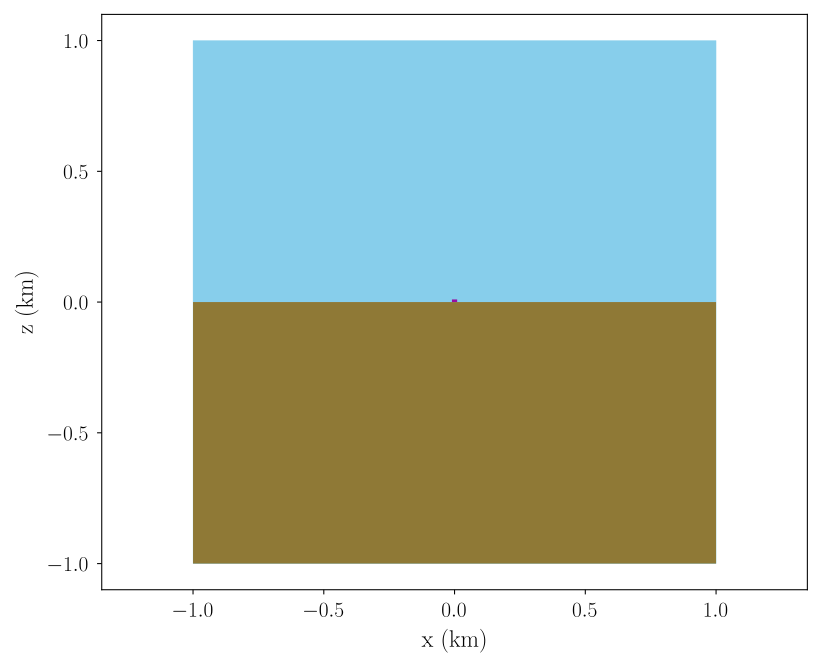
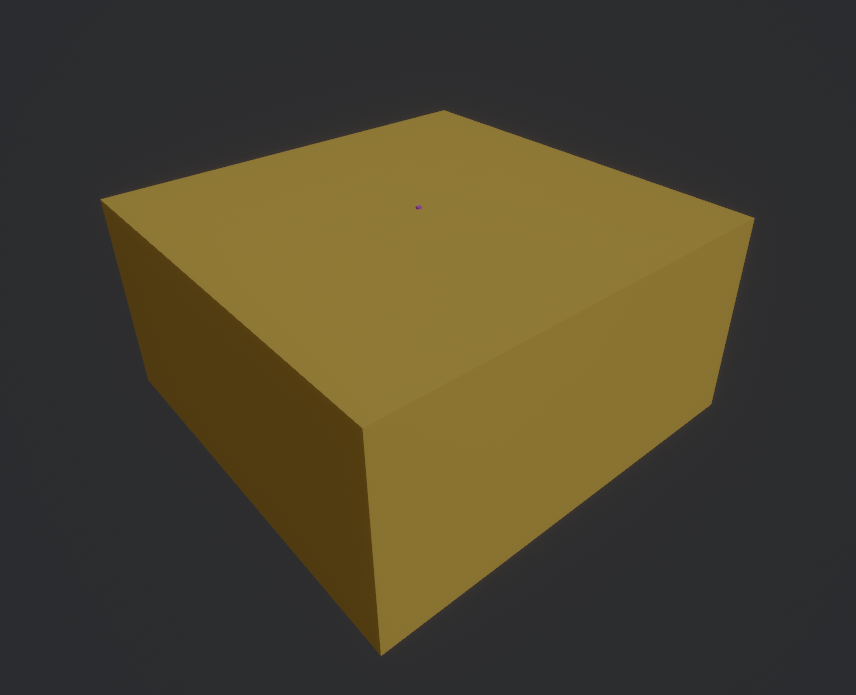
Fig. 1 Representations of the gamma/benchmark example. (A) Cross-section along the (xOz) plane. (B) Calzone display view (the root volume is transparent).#
Including a topography#
Let us now consider a more realistic example, in which the air-soil interface is described by a Digital Elevation Model (DEM), as in the geometry/topography example. The corresponding TOML geometry file is
[Environment]
envelope = { shape = "box", padding = [ 0, 0, 0, 0, 0, 3e4 ] }

[Environment.Terrain]
mesh = { path = "meshes/terrain.png", units = "m", padding = 200 }
material = "SomeRock"

[materials.mixtures]
SomeRock = { density = 2.0, state = "solid", composition = { StandardRock = 1 }}
This example introduces two new shapes that are specific to Calzone. Firstly,
the root volume is defined as a box-like Envelope Shape. This is a dynamic
shape whose extent adapts to its content. The padding attribute
indicates that the envelope should reserve 300 m of additional space along the
upward direction (i.e., along the z-axis), for the atmosphere above the ground.
Secondly, the ground is represented by the Terrain volume using a Mesh
Shape. The corresponding mesh is built from the DEM specified in
"meshes/terrain.png", whose system of units is metres. The DEM describes
a surface, \(z = f(x, y)\), which needs to be closed in order to be a valid
Geant4 volume. This is achieved by completing the DEM surface with five
axis-aligned flat faces in order to form a box-like base. In this situation, the
padding attribute specifies that the bottom face should be located
200 map units (i.e. metres) below the minimum height of the DEM
surface. The resulting geometry is represented in
Fig. 2 below.
In addition, the Terrain uses a custom "SomeRock" material whose
definition is inlined below. It is a derivative of the PDG standard rock, with a lower density, e.g. representing a porous rock.
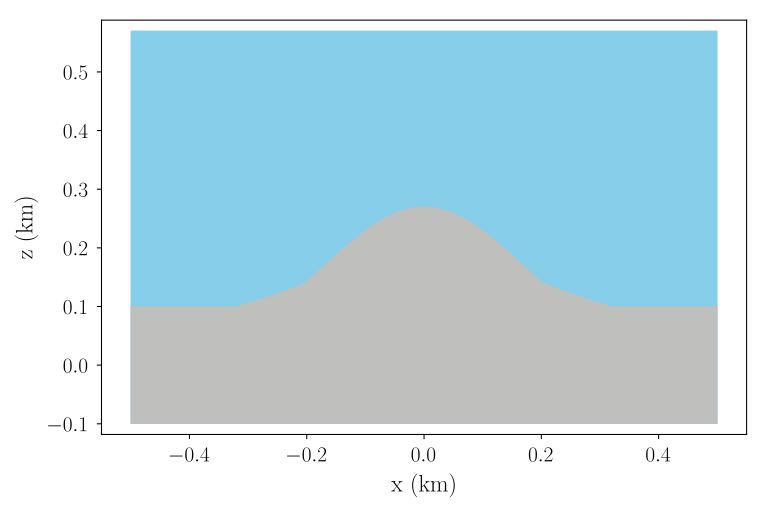
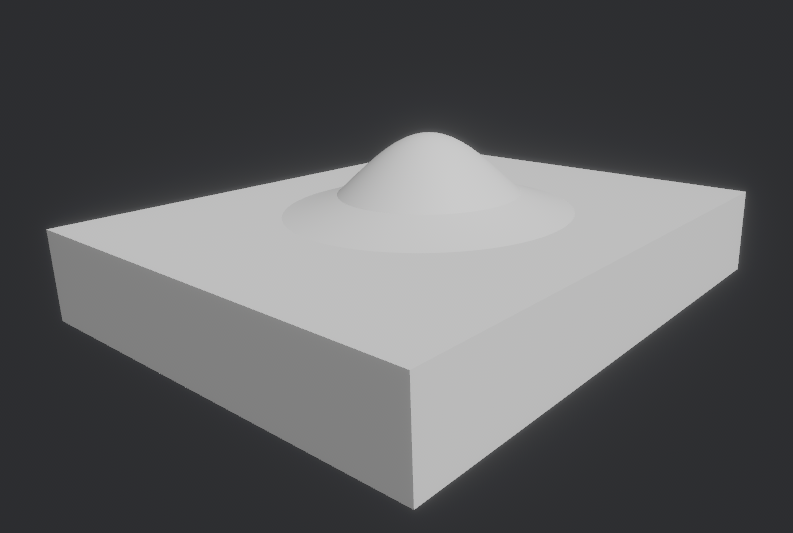
Fig. 2 Representations of the geometry/topography example. (A) Cross-section along the (xOz) plane. (B) Calzone display view (the root volume is transparent).#
Replicating a volume#
Finally, let us consider the case of replicating a composite volume at different locations, as with the muon/trajectograph example. In this use case, we consider a toy muography detector made of four identical detection planes (i.e. replicas) and a central lead-scatterer (to reject low-energy background particles). Replication is achieved by delegating the description of a single detection plane to an auxiliary file (layer.toml), which is included four times in the main geometry file, as below
[Detector]
include = [
    { name = "Layer0", path = "layer.toml", position = [ 0.0, -90.0, 0.0 ], rotation = [ 90.0, 0.0, 0.0 ] },
    { name = "Layer1", path = "layer.toml", position = [ 0.0, -30.0, 0.0 ], rotation = [ 90.0, 0.0, 0.0 ] },
    { name = "Layer2", path = "layer.toml", position = [ 0.0,  30.0, 0.0 ], rotation = [ 90.0, 0.0, 0.0 ] },
    { name = "Layer3", path = "layer.toml", position = [ 0.0,  90.0, 0.0 ], rotation = [ 90.0, 0.0, 0.0 ] },
]

[Detector.Scatterer]
material = "G4_Pb"
box = [ 120.0, 10.0, 130.0 ]
Note that an included geometry may itself include sub-geometries. For instance, in the current example, a detection plane is composed of six identical sub-units (named muon chambers), as below
[Layer]
material = "G4_AIR"
envelope = "box"

include = [
    { name = "Chamber00", path = "chamber.toml", position = [ -26.325, -36.0, 0.0 ] },
    { name = "Chamber01", path = "chamber.toml", position = [ -26.325,   0.0, 0.0 ] },
    { name = "Chamber02", path = "chamber.toml", position = [ -26.325,  36.0, 0.0 ] },
    { name = "Chamber10", path = "chamber.toml", position = [  26.325, -36.0, 0.0 ], rotation = [ 0.0, 0.0, 180.0 ] },
    { name = "Chamber11", path = "chamber.toml", position = [  26.325,   0.0, 0.0 ], rotation = [ 0.0, 0.0, 180.0 ] },
    { name = "Chamber12", path = "chamber.toml", position = [  26.325,  36.0, 0.0 ], rotation = [ 0.0, 0.0, 180.0 ] },
]
where the chamber.toml file contains the geometry description of a muon chamber. The resulting geometry is represented in Fig. 3 below.
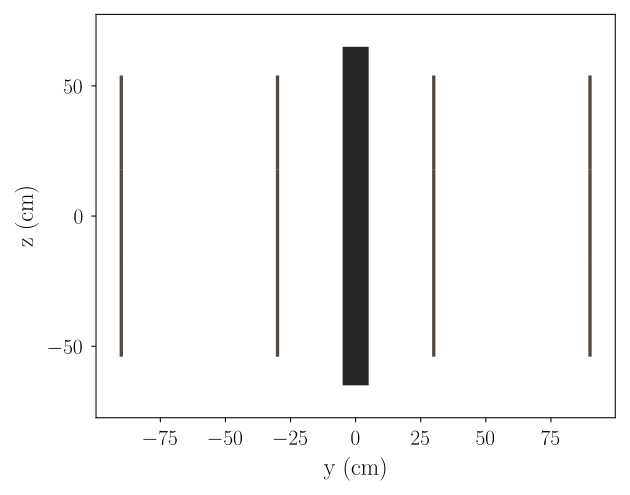
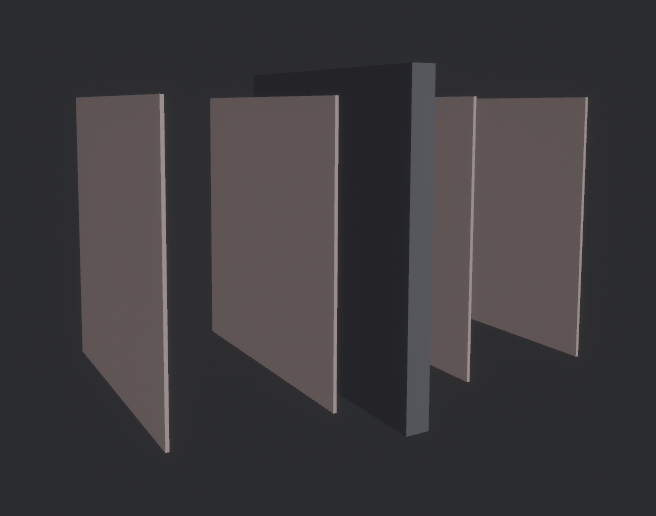
Fig. 3 Representations of the muon/trajectograph example. (A) Cross-section along the (yOz) plane. (B) Calzone display view (the root volume is transparent).#
Reference#
Geometry objects#
All geometry objects (volumes, shapes, materials, etc.) adhere to the same
data structure. A geometry object is represented by a Python
dict item (i.e. a [key: str, value: dict]
pair), where the key is the object name, and the value might
be another dict, e.g. containing the object’s properties.
To illustrate, a 1 cm3 cubic box shape writes,
box = { size = [ 1.0, 1.0, 1.0 ] }
Substitution rules#
For the sake of convenience, the values of geometry objects are subject to
certain substitution rules, which are listed in
Table 2. To illustrate, a
path-str (refering to a file) can be substituted for any
dict value. Another useful rule is that a size-one
dict whose item key can be inferred, can be substituted
with the item value. This occurs, for instance, for object values that have a
single mandatory property. Thus, using substitution rules, the previous cubic
box shape simplifies as,
box = 1.0
Type |
Substitute |
Comment |
|---|---|---|
|
|
|
|
|
If the |
|
|
E.g., |
|
|
E.g., |
|
|
Rotation vector (with angles in deg). |
Geometry structure#
A geometry definition starts with a root volume, for instance as follows,
[RootName]

box = 1.0
..
There can be only one root volume in a geometry. However, the geometry
dict might contain the additional "materials" and
"meshes" keys, for describing the geometry materials and specific
triangle meshes. The corresponding structure is summarised below, in
Table 3.
Volume definition#
The items of a Monte Carlo volume are presented in Table 4 below. If no shape is specified, then a box envelope is assumed. To illustrate, a 1 cm3 cubic box volume filled with water would be represented as follows,
[VolumeName]

material = "G4_WATER"
box = 1.0
Note that a volume can only have a single shape item (but multiple daughter volumes). For further information on shape types and their corresponding items, see Shape definition.
Key |
Value type |
Default value |
|---|---|---|
|
|
|
|
|
|
|
|
|
|
|
|
|
|
|
|
|
|
|
|
|
|
|
|
|
|
|
|
|
|
|
|
|
Roles#
By default, geometry volumes are inert, i.e. they do not record any Monte Carlo
information. The "role" property can be used to assign specific tasks.
A volume role is formed by a two words snake-cased sentence starting with a
verb (the action), and followed by a subject (the recipient). For example, the
following indicates that the volume should record energy deposits, and capture
outgoing particles.
role = [ "record_deposits", "catch_outgoing" ]
Possible actions and recipients are listed in Table 5 below.
Word |
Nature |
Description |
|---|---|---|
|
Verb |
Extract Monte Carlo particles at the volume boundary. |
|
Verb |
Silenty kill Monte Carlo particles at the volume boundary. |
|
Verb |
Record energy deposits and/or Monte Carlo particles. |
|
Subject |
Designates both energy deposits and particles. |
|
Subject |
Designates only energy deposits. |
|
Subject |
Designates only ingoing particles. |
|
Subject |
Designates only outgoing particles. |
|
Subject |
Designates both ingoing and outgoing particles. |
Note
Unlike other geometric properties, roles are not fixed. E.g., they can be
modified after the Monte Carlo geometry has been loaded (see the
Volume.role attribute).
Overlaps#
The "disentangle" and "subtract" volume properties address the
issue of overlaps between sister volumes in two distinct ways. The
"subtract" property explicitly specifies sister volumes (by their
name) whose shape are to be subtracted from the current volume. This can be
employed, for instance, to dig out a portion of a "Ground" volume to
accommodate a partially buried "Detector" volume.
Note
Only unsubtracted volumes can be subtracted from. Consequently, the subtract property does not permit the formation of subtraction chains.
The "disentangle" property indicates pairs of overlapping daughter
volumes which should be separated, (see Table 6), for
instance as,
[VolumeName.disentangle]

Bottom = [ "Left", "Right" ]
Top = "Left"
These volumes are separated using an iterative subtraction procedure. It should be noted that this procedure does not guarantee which volume is subtracted or not. It is therefore recommended that this method be used only for the purpose of patching small (erroneous) overlaps (e.g. due to numeric approximations).
Key |
Value type |
Default value |
|---|---|---|
|
|
Includes#
The "include" volume property permits the insertion of sub-geometries,
defined in auxiliary files, as daughter volumes. For example, as
[MotherName]

include = "relative/path/to/a/daughter/geometry.toml"
Some of the properties of the included root volume can be overridden, as detailed in Table 7 below. The following example explicitly sets the name of the included root volume.
[MotherName]

include = { name = "DaughterName", path = "relative/path/to/a/daughter/geometry.toml" }
Key |
Value type |
Default value |
|---|---|---|
|
|
|
|
|
|
|
|
|
|
|
|
|
|
|
Shape definition#
The available shape types are described below. Calzone only exports a limited number of the G4VSolids defined by Geant4, namely the box, cylinder and sphere shapes. For more complex use cases, meshes should be employed.
Note
Shape type names follow the snake_case syntax (i.e. like property names).
Box shape#
An axis-aligned box (G4Box), centred on the origin, and defined by its size (in cm) along the x, y and z-axis.
Key |
Value type |
Default value |
|---|---|---|
|
|
Cylinder shape#
A cylinder of revolution around the z-axis (G4Tubs), centred on the origin, and defined by its length (in cm) along the z-axis and its radius (in cm) in the xOy plane.
Key |
Value type |
Default value |
|---|---|---|
|
|
|
|
|
|
|
|
|
|
|
|
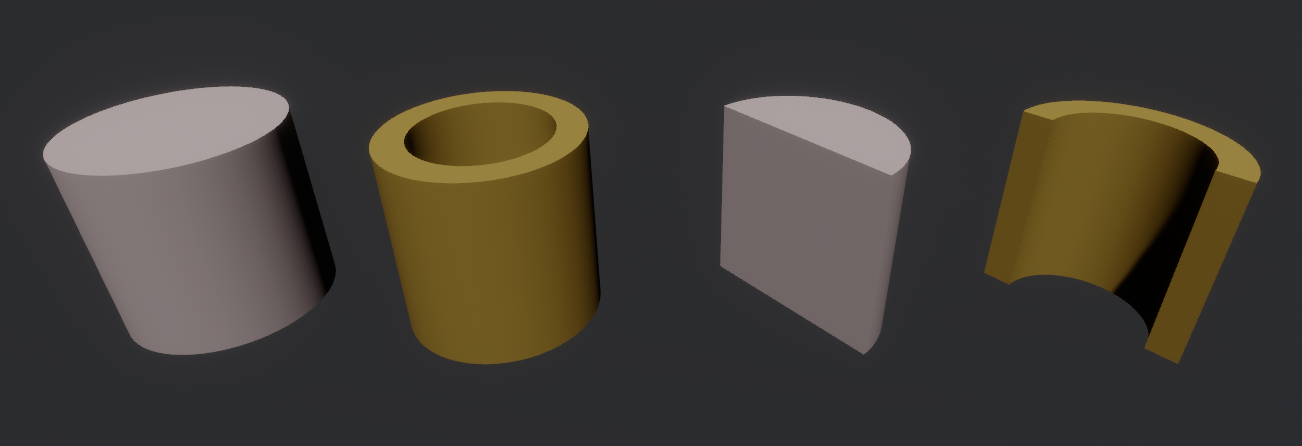
Fig. 4 Examples of cylindrical shapes visualised with Calzone display. The gold shapes are hollow cylinders, while the silver ones are plain cylinders. The shapes on the right are cylindrical sections, while those on the left are full cylinders.#
Envelope shape#
A bounding envelope with a specified shape, whose size is determined by the bounded daughter volumes. The padding parameter (in cm) allows for extra space around bounded objects.
Key |
Value type |
Default value |
|---|---|---|
|
|
|
|
|
|
Mesh shape#
A triangle mesh defined from a data file (path property) with the specified length units.
Key |
Value type |
Default value |
|---|---|---|
|
|
|
|
|
|
|
|
|
The actual shape depends on the data file format. If the file is a native 3D model (in OBJ or STL format), then the mesh is directly imported. Alternatively, the data can also be a surface described by a Digital Elevation Model (DEM), in GeoTIFF or Turtle / PNG [NBCM20] format. In this case, elevation values are assumed to be along the z-axis, and the surface is closed by adding side and bottom faces. The additional properties described in Table 12 control the generated 3D shape.
Key |
Value type |
Default value |
|---|---|---|
|
|
100.0 (in map units) |
|
|
|
|
|
|
Tip
The Map.dump() method allows one to export the
generated 3D topography in STL format.
Sphere shape#
A sphere (G4Orb or G4Sphere), centred on the origin, and defined by its radius (in cm).
Key |
Value type |
Default value |
|---|---|---|
|
|
|
|
|
|
|
|
|
|
|
|
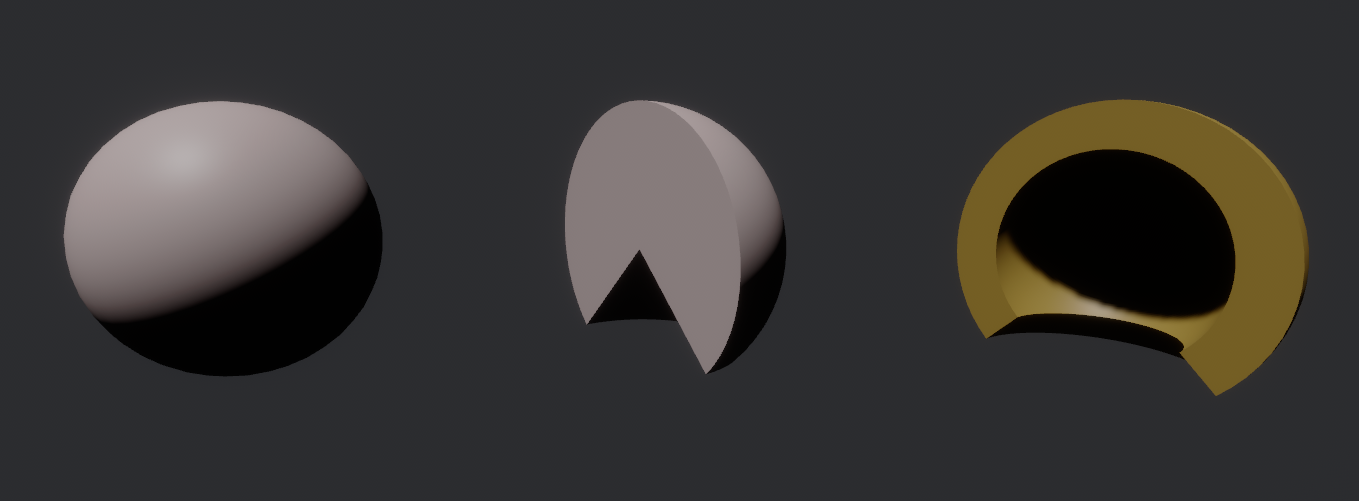
Fig. 5 Examples of spherical shapes visualised with Calzone display. The gold shape is a hollow sphere, while the silver ones are plain spheres. The shape on the left is a full sphere, while those on the left are spherical sections.#
Meshes definition#
Mesh shapes can be explicitly assigned a name, enabling cross-referencing. This
is achieved by first defining a mesh name along with its attributes under the
meshes field (in accordance with Table 14 below).
Subsequently, the designated mesh name can be utilized as a shape value in
volume definitions, in lieu of a dictionary description. For instance,
[meshes]
Screw = { path = "/path/to/screw.stl", units = "mm" }

[LeftScrew]
material = "Steel"
mesh = "Screw"
position = [ -3.0, 0.0, 0.0]

[RightScrew]
material = "Steel"
mesh = "Screw"
position = [  3.0, 0.0, 0.0]
Materials definition#
A Geant4 material (G4Material) can be defined either as an assembly of atomic elements (G4Elements), denoted Molecule herein, or as a Mixture of other materials.
Tip
A collection of standard atomic elements and materials is readily available
from the Geant4 NIST database. For example, "G4_WATER",
"G4_AIR", etc. In addition, Calzone also predefines
"StandardRock" (following the PDG ). Thus,
depending on your application, you may not need to define your own materials.
Tip
In addition to the JSON, TOML and YAML formats, Calzone also supports importing materials from a Gate DB file.
Materials table#
The structure of a materials table is described by Table 15 (et al.) below. Molecules and Mixtures are explictily separated. For instance,
[molecules]

H2O = { .. }

[mixtures.Air]

density = 1.205E-03
..
In addition, the materials table may also contain (custom) atomic elements.
Atomic elements#
Atomic elements are specified by their atomic number (Z) and by their mass number (A, in g/mol). Optionally, a symbol can be specified.
Key |
Value type |
Default value |
|---|---|---|
|
|
|
|
|
|
|
|
|
Molecules#
Molecules are defined by their density (expressed in in g/cm3) and
their atomic elements composition. Additionally, a state may be specified
("gas", "liquid" or "solid"). In the absence of an
explicit composition specification, it is inferred from the molecule name, which
is interpreted as a chemical formula. For example,
[molecules]

H2O = { density = 1.0, state = "liquid" }
Key |
Value type |
Default value |
|---|---|---|
|
|
|
|
|
|
|
|
|
Key |
Value type |
Default value |
|---|---|---|
|
|
Mixtures#
Mixtures are specified by their density (in g/cm3) and their mass
composition. Optionaly, a state can be specified ( "gas",
"liquid" or "solid"). For instance,
[mixtures.Air]

density = 1.205E-03
state = "gas"
composition = { N = 0.76, O = 0.23, Ar = 0.01 }
Key |
Value type |
Default value |
|---|---|---|
|
|
|
|
|
|
|
|
|
Key |
Value type |
Default value |
|---|---|---|
|
|
|
|
|